

Desktop .env file manager
Manage every .env file from one desktop workspace.
EnvDesk is a local-first .env file manager for Windows, macOS, and Linux. It organizes existing environment files across projects, lets you inspect and edit their keys, compares environments, masks sensitive values, and asks you to review every change before writing it back to disk.
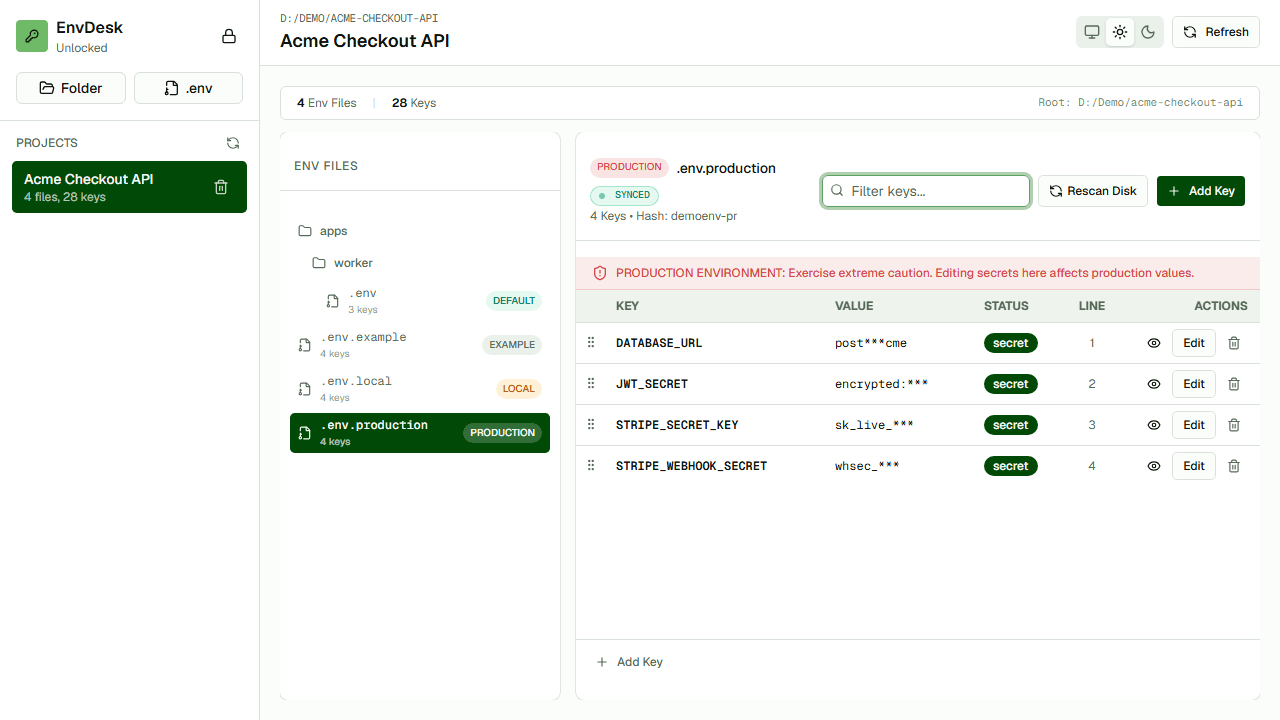
One project view
Bring project folders and standalone environment files into one workspace without relocating them.
Key-aware comparison
Compare environments by key so missing and different entries are easy to identify.
Review before write
See proposed file changes before EnvDesk applies them to disk.
How the workflow works
- 01Import a project folder or an individual .env file.
- 02Browse files and compare the environments that matter.
- 03Edit keys or values and review the proposed write.
- 04Confirm the change to update the local file.
When it is useful
- Developers working across several repositories
- Projects with development, staging, and production files
- Local workflows that must keep values off a hosted workspace
Questions developers ask
Does EnvDesk replace my .env files?
No. EnvDesk works with the files already stored on your computer and writes approved changes back to those files.
Is EnvDesk a production secrets manager?
No. EnvDesk is a local environment-file workspace. Use dedicated infrastructure for production access control, rotation, sharing, and audit logs.